ROAS is the number every performance team reports. It is quick to read and every ad platform shows it. It is also blind to the one thing that decides whether an ad paid off: how much of each euro of revenue is left after product, shipping, fees and returns.
A ROAS of 4 means €4 of revenue for every €1 of ads. For a product with a 50% margin after costs, that is a healthy profit. For a discounted bundle with a 22% margin, it is a loss. Same ROAS, opposite result.
This guide covers what ROAS measures, how it differs from ROI, POAS and MER, how to calculate break-even ROAS from your own margin (and why the platforms' version includes VAT), how to turn it into a target ROAS for Google and Meta, and how every Black Friday discount raises the bar.
Admetrics is a marketing measurement and budget platform for ecommerce and DTC brands. We measure what drove each order independently of the ad platforms and work out the profit left after costs and returns.
Key takeaways
- ROAS = revenue from ads ÷ ad spend. It shows efficiency, not profit.
- Break-even ROAS = revenue ÷ contribution margin (CM2). With 38.75% of net revenue left after product, shipping and fees, break-even ROAS is 2.6.
- Ad platforms report ROAS on gross revenue, including VAT. At 19% VAT the same break-even is 3.1 in platform terms.
- Profit after ad spend = spend × (ROAS × margin − 1). At a 22% margin, a ROAS of 4 loses €1,200 on €10,000 of spend.
- Target ROAS = 1 ÷ (margin − the profit share you want to keep). Set it from your margin, not from a benchmark.
- Every discount raises the bar. In our example, break-even ROAS goes from 2.6 at full price to 4.2 at 20% off and 7.4 at 30% off; at 40% off, no ROAS is enough.
What is ROAS?
ROAS = revenue attributed to ads ÷ ad spend
€30,000 of revenue from €10,000 of ad spend is a ROAS of 3.0, often written as 300% or 3x. It tells you how much revenue each euro of advertising brought in, according to whoever did the attributing.
That last part matters. Each ad platform calculates ROAS on the conversions it counts, inside its own attribution window. Add up the ROAS from Meta, Google and TikTok and the platforms often claim more revenue than the shop took. Our MER vs ROAS guide covers why.
ROAS, ROI, POAS and MER
ROAS is the right number for comparing campaigns quickly. It's the wrong number for deciding whether they make money, unless you compare it with your break-even.
Break-even ROAS
Break-even ROAS is the ROAS at which an order's margin exactly pays for the ads that won it. Below it, every order loses money; above it, every order earns.
Break-even ROAS = net revenue per order ÷ CM2 per order = 1 ÷ CM2 ratio
CM2 is contribution margin after product cost, fulfilment, shipping, payment fees and returns. Our contribution margin guide explains each layer.
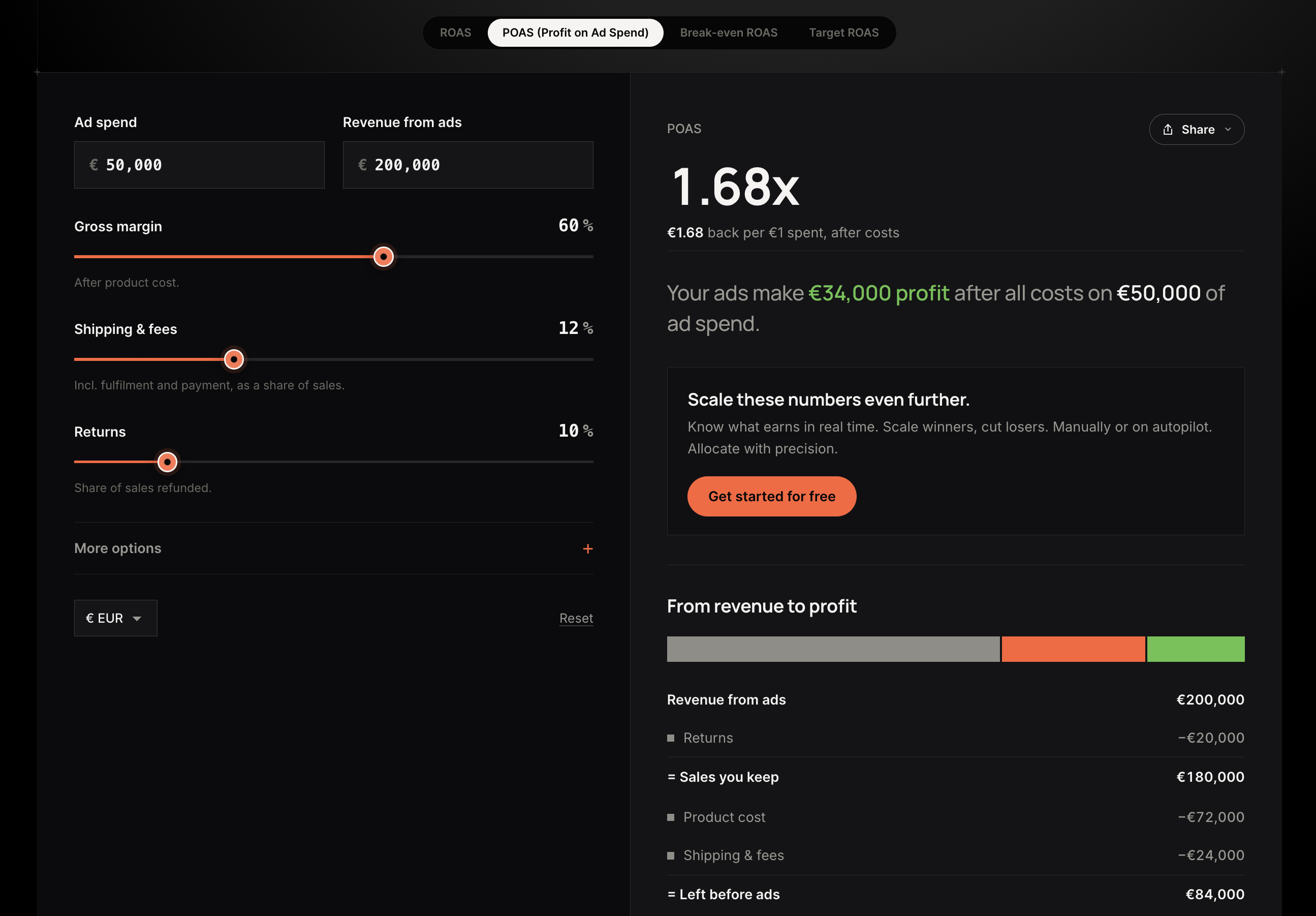
Worked example
Why the platforms' number is higher
Meta and Google usually receive the purchase value the shop sends them, which is often the gross amount including VAT, and sometimes including shipping charged to the customer. If your platform reports ROAS on gross revenue, compare it with the gross break-even (3.1 here), not the net one (2.6). Check what your purchase events actually send before setting any target.
Don't forget returns
If 10% of orders come back and each return costs €12 in shipping, handling and write-offs, expected returns cost €1.20 per order. CM2 drops to €29.80 and break-even ROAS on net revenue rises from 2.6 to 2.7. For fashion and other high-return categories, the difference is much larger.
Profit after ad spend
Once you know the margin, ROAS converts straight into profit:
Profit after ad spend = ad spend × (ROAS × CM2 ratio − 1)

Two campaigns, €10,000 each
Ranked by ROAS, campaign A wins and gets more budget. Ranked by profit, it's the one losing money. This is the most common way a good-looking Black Week ends in a loss: the budget follows the highest ROAS, and the highest ROAS sits on the thinnest margin.
The fix is either to compare each campaign's ROAS with the break-even ROAS for its own products, or to rank campaigns on POAS (contribution margin ÷ ad spend) directly.
Target ROAS: what to set in Google and Meta
Break-even is the floor. A target ROAS adds the profit you want to keep.
Target ROAS = 1 ÷ (CM2 ratio − the share of revenue you want to keep as profit)
In the example, to keep 10% of net revenue as profit after ads: 1 ÷ (0.3875 − 0.10) = 3.5 on net revenue, or about 4.1 in platform terms including 19% VAT.
Putting it into the platforms
- Google Ads: target ROAS is entered as a percentage, so 4.1 becomes 410%. Set it per campaign or portfolio, and change it in small steps rather than all at once.
- Meta: the ROAS goal bid strategy takes the minimum ROAS you want, here 4.1.
- Check the conversion value first. The target only works if it's on the same basis as the value your purchase events send: gross or net, with or without shipping.
- Different products, different targets. A single account-wide target over-pays for low-margin products and under-bids on high-margin ones. Group campaigns by margin, or send a margin-based conversion value so bidding works on profit rather than revenue.
Platform-reported ROAS only counts the conversions each platform sees. Before tightening a target, check how many purchases the platforms miss: across Admetrics customers, about 30% more purchases are tracked than the ad platforms report.
ROAS in Black Week: every discount raises the bar
A discount lowers the price, but not the product cost, the shipping label or most of the payment fee. So CM2 falls much faster than revenue, and break-even ROAS climbs.
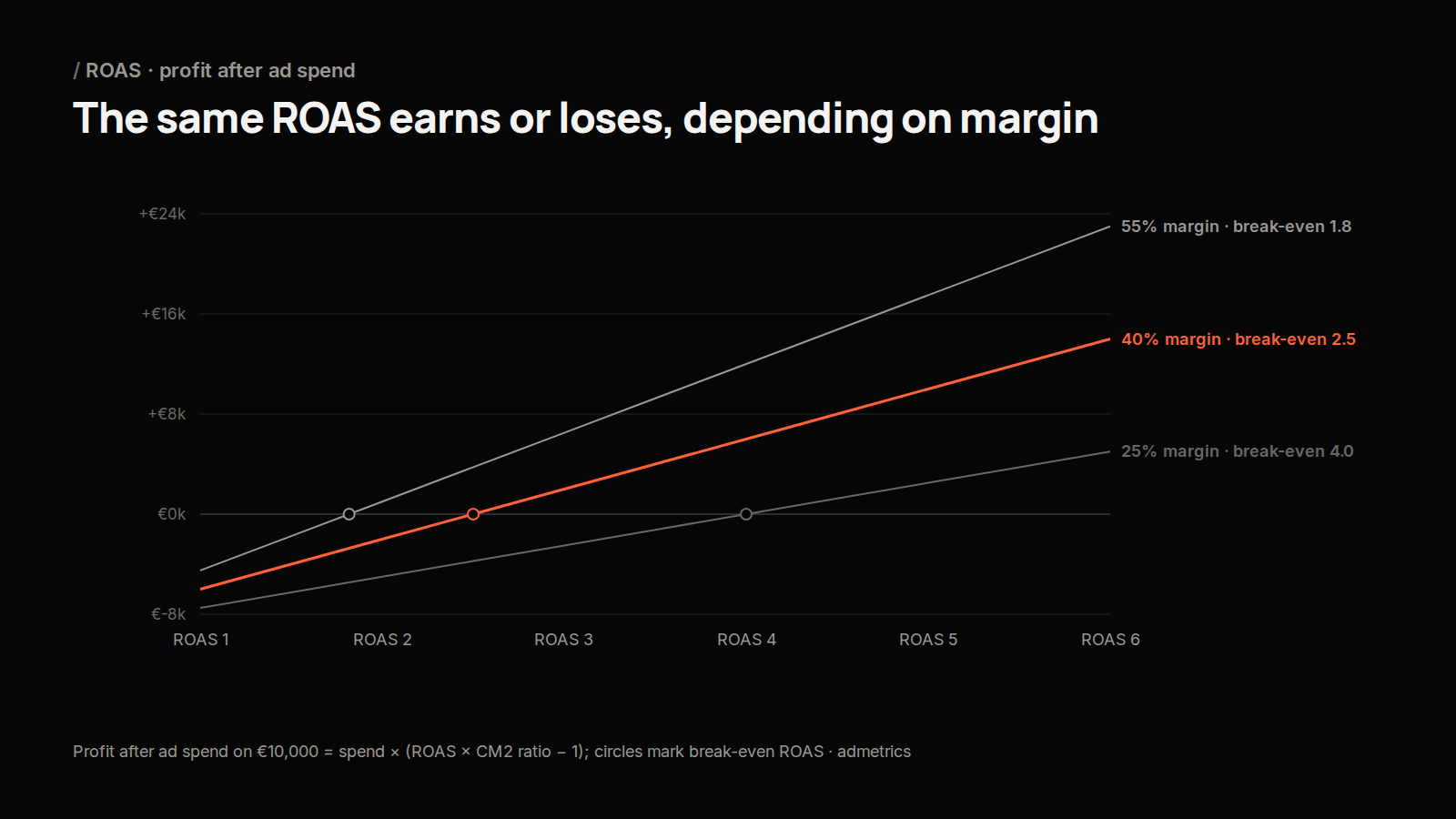
The target ROAS you set in October, at full price, will spend money at a loss on Black Friday if most orders carry a discount. Three things to do before the week:
- Recalculate break-even and target ROAS at the discount you'll actually run, and update the platform targets on the day the offer starts.
- Set different targets for different discount depths. A 20%-off campaign and a 30%-off campaign need very different floors.
- Watch the whole week, not just each platform. Platforms each claim the same orders on peak days; check MER against your break-even several times a day. See the MER vs ROAS guide.
Common mistakes
- Using one benchmark as the target. "A good ROAS is 4" means nothing without your margin. At 25% CM2, 4 is break-even; at 50%, it's a strong profit.
- Comparing net break-even with gross platform ROAS. Mixing the two makes every campaign look 19% better than it is.
- Leaving out returns. In high-return categories, returns can move break-even ROAS by more than a full point.
- Keeping October targets in November. Every discount step raises break-even ROAS.
- Adding up platform ROAS. The platforms count some orders more than once; use MER for the total.
ROAS calculator
Try it with your own numbers: the free ROAS calculator shows your ROAS and your break-even ROAS. For the margin it needs, use the contribution margin calculator.
FAQ
How do you calculate ROAS?
Divide the revenue attributed to your ads by the ad spend. €30,000 of revenue from €10,000 of ads is a ROAS of 3.0 (300%).
What is a good ROAS?
One above your break-even ROAS, which is 1 divided by the share of revenue left after product, shipping, fees and returns. With 40% left, break-even is 2.5; with 25% left, it's 4.0.
What is break-even ROAS?
The ROAS at which the margin on an order exactly pays for the ads. Below it, each order loses money.
Should ROAS include VAT?
The ad platforms usually report it on the value your shop sends them, often including VAT. Compare like with like: gross ROAS with a gross break-even, net with net.
What target ROAS should I set for Black Friday?
Recalculate it at your Black Friday discount. In our example, break-even rises from 2.6 at full price to 4.2 at 20% off and 7.4 at 30% off, before any profit.
What is the difference between ROAS and POAS?
ROAS divides revenue by ad spend; POAS divides contribution margin by ad spend. A POAS above 1.0 means the ads made money.
See ROAS against your real margin
Admetrics shows ROAS, POAS and contribution margin per channel, campaign and product, measured independently of the ad platforms and with returns included. You see which campaigns earn, not just which ones sell.
Run your biggest week free: Admetrics is free until 1 December. No credit card, no commitment. Get started for free