The gross margin in your Shopify admin looks healthy. The ROAS in Meta Ads Manager looks fine. Then the month closes, and what's left is far smaller than either number led you to expect.
Both reports are right as far as they go.
Gross margin stops at the cost of the product and ROAS stops at the cost of the ads. The parcel and the payment fee sit in neither report, the orders that come back only in Shopify's, and in the example below the three take almost as much out of the order as the ads do.
This Shopify profit margin calculator answers the question underneath both: how much profit does each order actually make? In the worked example, a bag sells for €85 including German VAT and the store makes €16.41. The other €68.59 goes to VAT, refunds, the product, shipping and fulfillment, payment fees and ads. The Profit margin tab gives you that figure for the price you charge today, and the Target price tab works backwards from the margin you want to the price you'd need.
Find each number before you type it
| Field | Example | Where the real number is |
|---|---|---|
| Selling price | €85 | What a typical order pays after discount codes, from the order list in Shopify admin |
| Prices incl./excl. VAT + country | Incl. VAT, Germany (19%) | The tax settings in Shopify admin show whether prices include tax |
| Product cost | €24 | "Cost per item" in Shopify admin, if it's what one unit costs delivered to the warehouse |
| Shipping and fulfillment | €7.50 | The 3PL invoice (pick, pack, packaging, label) ÷ orders, minus what customers pay for shipping |
| Shopify plan + payment method | Grow, Shopify Payments: 1.8% + €0.30 | Your plan in Shopify admin; the method prefills both fee numbers, which you can check against the payment provider's statement |
| Return rate | 12% | Refunded orders ÷ all orders in Shopify admin. The model assumes full refunds, so with many partial returns use refunded value ÷ sales |
| CPA (cost per order) | €16 | Spend in Meta Ads Manager, Google Ads and every other channel ÷ Shopify orders |
Take every figure from the same month.
Product cost from last quarter, a return rate from a quiet month and ad spend from a busy one add up to a margin the store never had, and with each number living in a different tool the mismatch is easy to miss.
Follow €85 from checkout to your profit
The example is illustrative: a bag at €85 incl. 19% German VAT, a product cost of €24, €7.50 for shipping and fulfillment, Shopify Payments on the Grow plan at 1.8% + €0.30, a 12% return rate and €16 of ads per order.
Read it the way you'd check a supplier invoice, top line first.
| Line | € | % of net sales |
|---|---|---|
| Selling price | 85.00 | |
| Refunds (12% returned) | −10.20 | |
| VAT | −11.94 | |
| = Net sales | 62.86 | |
| Product cost (on the 88% kept) | −21.12 | |
| = Gross profit | 41.74 | 66.4% |
| Shipping and fulfillment | −7.50 | |
| Payment fees (1.8% × €85 + €0.30) | −1.83 | |
| = After shipping and fees | 32.41 | 51.6% |
| Ads | −16.00 | |
| = Profit | 16.41 | 26.1% |
Every percentage on this page is a share of net sales: the price after refunds and VAT (€62.86 here). A 20% margin means 20% of that figure.
Refunds come off first, because money that went back to the customer was never revenue. VAT is then worked out on the sales that stay, which is why the VAT line is smaller than the tax on a single €85 invoice.
Product cost counts only on the 88% of orders customers keep, since a returned bag goes back on the shelf. The payment fee counts on every order and on the full €85 with VAT. We charge it that way because the provider takes its percentage from what the card is charged, and Shopify Payments doesn't return the original fee when you refund.
Each subtotal answers its own question. Gross profit of €41.74 is what the product earns at its price. The €32.41 after shipping and fees is what's left to pay for ads, and the €16.41 at the bottom is the order's profit before salaries, rent and software.
Gross margin, markup and the point where Shopify stops
Price against product cost alone gives a gross margin of 66.4% (a net price of €71.43 against €24) and a markup of 197.6%.
Both numbers are correct, and both describe the bag before anyone has packed it, shipped it or paid to sell it.
Shopify's profit reports work the same way: gross profit there is net sales minus the cost per item you enter, and because ad spend, payment fees and return costs aren't part of that cost, the report ends at the €41.74 line on the receipt, with three deductions still to come below it.
Take VAT out before you calculate anything
Shopify's own reports already handle this part, since net sales there exclude tax. The trouble starts in the spreadsheet, the ROAS math and anything else built on the price the customer pays, which in the EU includes VAT. Enter €85 as if it were the price before VAT and every line below it inflates.
| VAT taken out (correct) | €85 entered as excl. VAT | |
|---|---|---|
| Net sales | €62.86 | €74.80 |
| Profit | €16.41 | €28.35 |
| Profit margin | 26.1% | 37.9% |
| Gross margin | 66.4% | 71.8% |
The order appears to make €28.35. It makes €16.41, and the gap is exactly the VAT line of €11.94, because product cost, shipping and the fee don't change.
Take VAT out before you set a spreadsheet margin next to the one in Shopify's reports. A margin worked out on a mix of VAT-inclusive and VAT-exclusive prices invents differences that aren't there.
The payment fee is the one cost that still sees VAT. It's charged on the full €85.
How returns cut your profit
Three return costs sit outside the model: return labels, return handling by your 3PL, and items that can't be sold again at full price. If they show up as real lines on the 3PL invoice or in the stock count, add their monthly total divided by orders to shipping and fulfillment, and every order carries its share.
Everything else follows a simple model: a returned order is refunded in full and the item goes back into stock.
| Return rate | Profit | Profit margin |
|---|---|---|
| 0% | €22.10 | 30.9% |
| 12% (example) | €16.41 | 26.1% |
| 18% | €13.56 | 23.2% |
At 12%, returns cost €5.69 per order. The calculator refunds €8.57 of sales after VAT and puts €2.88 of product back on the shelf, and the difference is the margin that leaves with each refund.
Shipping, the payment fee and the ads on a returned order were paid when it went out, and they sit in their own lines on the receipt, which is why the €5.69 doesn't include them. Nor does the carrier hand back the cost of a label because the parcel came home.
Gross margin reads 66.4% at every rate in the table, since a refund removes the sale and, with the bag back in stock, the matching product cost in the same proportion. What falls is the profit margin at the bottom, because shipping, the fee and the ads now sit on fewer sales.
Shipping and fees stay the same at any price
VAT, refunds and most of the payment fee scale with the price. The parcel and the €0.30 don't, and a label costs what it costs whether the product inside sells for €85 or for half that.
Add €1 to shipping and fulfillment and the bag makes €15.41 instead of €16.41. A one-euro change on a 3PL rate card takes 6.1% off the order's profit.
The payment method moves the number too. On the Grow plan, with the calculator's presets for Germany (checked 5 Oct 2026):
| Method | Fee preset | Fee on €85 | Profit |
|---|---|---|---|
| Shopify Payments | 1.8% + €0.30 | €1.83 | €16.41 |
| Stripe (incl. Shopify's 1% fee for other providers) | 2.5% + €0.25 | €2.38 | €15.86 |
| Mollie cards (incl. 1%) | 2.8% + €0.25 | €2.63 | €15.61 |
| Shopify Payments, Amex/international | 2.9% + €0.30 | €2.77 | €15.47 |
| Klarna (through Shopify Payments) | 2.99% + €0.35 | €2.89 | €15.35 |
| PayPal (incl. 1%) | 3.99% + €0.39 | €3.78 | €14.46 |
The plan picker covers Basic, Grow, Advanced and Plus, and the fees update with it. On Plus, Shopify Payments drops to 1.3% + €0.30, or €1.41 on the €85 bag, which then makes €16.83, and Shopify's fee for other providers falls to 0.2%.
Your real rate is a blend of whatever customers choose at checkout. If a large share of orders go through PayPal or Klarna, the Shopify Payments preset will understate your fees by more than a few cents an order, and both fee fields stay editable for that reason.
A cheaper product with the same margin loses money
Now take a €45 product with the same 66.4% gross margin and give it the same shipping, fee and €16 CPA.
| €85 bag | €45 product | |
|---|---|---|
| Product cost | €24.00 | €12.70 |
| Gross margin | 66.4% | 66.4% |
| Gross profit | €41.74 | €22.10 |
| After shipping and fees | €32.41 | €13.49 |
| Profit | €16.41 | −€2.51 |
Same gross margin, and one of them loses money on every order.
Shipping, the €0.30 and the CPA are the same euros on both products, and on €45 they take a much bigger share. Judge a low-priced product by what's left after shipping and fees, because gross margin alone rates the two as equally good.

Ads take the biggest share of what's left
In the calculator, CPA means total ad spend across all channels divided by all orders in the same period. Meta Ads Manager shows a different CPA, because platform attribution counts orders its own way and usually counts more of them.
The €32.41 left after shipping and fees is the most the bag can spend on ads before it loses money. Divide the €85 price by it and you get a break-even ROAS of 2.62.
That 2.62 is blended: price over ad spend per order, counted across all orders. Hold it against your total revenue incl. VAT divided by your total ad spend across every channel for the same month. The ROAS that Meta or Google reports for itself is a different figure, since each platform counts the orders it attributes to its own ads. Two checks before comparing: the revenue should include VAT, and it should count orders before refunds, as the 2.62 does.
We'd judge ad spend against the €32.41 line rather than against gross margin. Gross margin leaves the parcel and the payment fee still to pay, and those come out of every order whether the ads worked or not.
At €16, ads take 49% of the €32.41, the largest single cost after the product. How far the CPA can go:
| Goal | Most CPA per order | Blended ROAS needed (incl. VAT) |
|---|---|---|
| Break even | €32.41 | 2.62 |
| 20% profit margin | €19.84 | about 4.3 |
The €19.84 is the €32.41 minus 20% of the €62.86 in net sales, and since the two tiles in the calculator show only the break-even point, the way to find the CPA for a target margin is to raise the CPA field until the margin line reads 20%.
When we set up Admetrics for a store, we start from this blended CPA and then split it by channel and campaign using the store's own orders, because a blended figure can sit comfortably under €19.84 while individual campaigns sit far above it.

Work out the price for the margin you want
The Target price tab takes the same costs and a margin you pick (chips for 10, 20, 30 and 40%) and returns the lowest price that keeps it.
| Margin wanted after all costs | Lowest price incl. VAT |
|---|---|
| 10% | €69.37 |
| 20% | €78.31 |
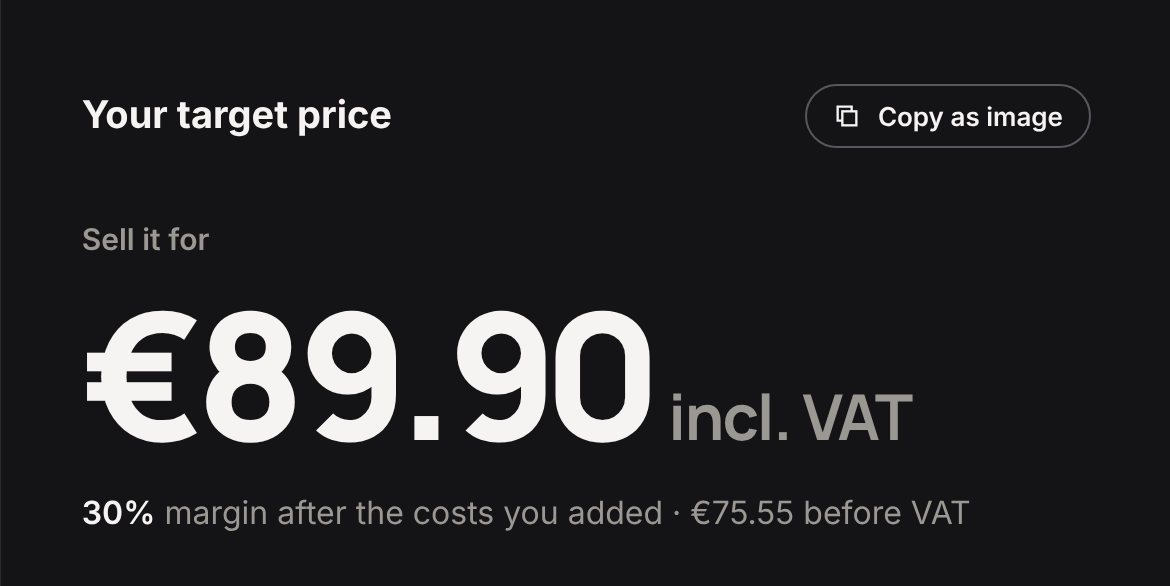
| 30% | €89.90 |
At 30%, the bag would sell for €89.90, or €75.55 before VAT, and make €19.94 per order, a 30.0% profit margin. At that price the most it can spend on ads rises to €35.94 and break-even ROAS falls to 2.50. The 10% and 20% prices come out below €85 because the bag already makes 26.1% at €85.
When costs are too high for the margin you ask for, the tab tells you the margin can't be reached instead of giving you a price.
What is a good profit margin?
One that pays your fixed costs and leaves profit, which only your own numbers can tell you. Team, rent, software and agency retainers never appear on the receipt, and all of them get paid out of order profit.
| Illustrative month | |
|---|---|
| Fixed costs | €40,000 |
| Orders | 4,000 |
| Fixed costs per order, on average | €10 |
| Profit from 4,000 orders at €16.41 | €65,640 |
| Left after fixed costs | €25,640 |
The €10 is an average, and it isn't a hurdle every order has to clear. A product that makes less still helps pay fixed costs if its orders are extra sales rather than ones taken from better products.
The verdict bands (Losing money below 0, Thin margin up to 10%, Healthy up to 20%, Strong above that) are a reading aid. They say nothing about your category, and the bag reads Strong at 26.1% whether or not its orders cover your fixed costs.
What this calculator can't tell you
It works with one product, one payment method and one blended CPA, and real stores have none of those.
Customers buy baskets, and two items in one parcel share a single label and a single fixed fee. Checkout mixes cards, Klarna and PayPal. Campaigns buy orders at very different costs, while the calculator sees only the average. Returns follow the simple model above, without labels, handling or stock you can't resell at full price, and chargebacks (a customer disputing a payment with their bank) aren't modeled at all. If the question is what a promotion does to your margin, the discount profit calculator is built for that.
Admetrics calculates profit margin per product, campaign and channel from your real orders, returns and costs, and shows which of them pull the average down.
FAQ
How do I calculate profit margin in Shopify?
Shopify's profit reports give you gross profit: net sales minus the cost per item you've entered. Ad spend, payment fees and return costs aren't part of that cost. For an order's real profit, take VAT and refunds off the price, then subtract product cost on kept orders, shipping and fulfillment, payment fees and ads. In the example, an €85 order makes €16.41.
What's the difference between margin and markup?
Both compare price with product cost, from opposite ends. Margin is profit divided by the price before VAT, and markup is profit divided by cost. The €85 bag has a net price of €71.43 and a product cost of €24, which gives a gross margin of 66.4% and a markup of 197.6%. As long as there's any profit at all, markup is the bigger of the two.
Should I enter prices with or without VAT?
Enter the price your customers see and tell the calculator whether it includes VAT, which for EU consumer prices it does. Pick the country and the calculator takes the right rate out. Entering €85 as a price before VAT shows the bag making €28.35 instead of €16.41, a gap of exactly the €11.94 of VAT.
How do returns affect my profit margin?
A returned order is refunded in full and the item goes back into stock, which means the margin on that sale is lost. Shipping, the payment fee and the ads on it were already spent. In the example, a 12% return rate costs €5.69 per order, and the bag makes €16.41 instead of €22.10 with no returns.
What goes into shipping and fulfillment?
Everything you pay per order to get it out the door: pick and pack, packaging and the shipping label, minus what the customer pays you for shipping. If your 3PL bills return labels and return handling, add the monthly total divided by orders here, since the calculator's return model leaves them out.
Which payment method costs the least?
Among the calculator's presets on the Grow plan, Shopify Payments is cheapest for cards at 1.8% + €0.30, or €1.83 on the €85 bag. PayPal, including Shopify's 1% fee for other providers, costs €3.78 on the same order. Your real rate depends on the mix of methods customers pick at checkout. Rates are for Germany, checked 5 Oct 2026.
What's the profit margin formula?
Profit margin is an order's profit divided by its net sales. Net sales are the price after refunds and VAT. Profit is net sales minus product cost, shipping and fulfillment, payment fees and ads. For the bag, €16.41 ÷ €62.86 = 26.1%. Gross margin uses the same base but stops after product cost.
How do I find the price for a 20% margin?
Open the Target price tab, enter your costs and pick 20%. The calculator returns the lowest price incl. VAT that leaves a 20% profit margin after every cost. For the example bag, that's €78.31 (€65.81 before VAT), making €11.58 per order. If your costs make 20% impossible at any price, it tells you so.
Silvana Chirita writes about ecommerce measurement for Admetrics. Last updated 9 October 2026.