Confused about GA4 vs. Admetrics? Let’s find out which one actually helps you scale your brand profitably.
Scaling a DTC brand shouldn’t feel like decoding a black box. Yet, that’s exactly how many founders and growth leads feel when trying to interpret Google Analytics 4 (GA4). Between "thresholding," data sampling, and unassigned traffic, getting a clear answer to "Did this ad actually make money?" is harder than it should be.
Admetrics, on the other hand, flips the script. It moves beyond basic traffic reporting to deliver profit-first intelligence—turning complex data into clear, actionable insights about contribution margin, true ROAS, and customer lifetime value.
In this guide, we’ll explore why accurate eCommerce metrics are the lifeblood of scaling, why GA4 falls short for modern brands, and how Admetrics provides the clarity you need to spend confidently.
GA4 vs. Admetrics Why eCommerce Metrics Matter for Growth
In 2026, the eCommerce landscape is unforgiving. With rising CPMs and privacy regulations tightening, accuracy is your competitive advantage.
If you run an online store, you don't just need to know how many people visited; you need to know how much profit each visitor generated. eCommerce metrics are the compass that guides your budget allocation.
- Wrong Data: You turn off a high-performing Facebook ad because GA4 says it has zero conversions (due to attribution signal loss).
- Right Data: You scale that same ad because Admetrics reveals it has a 3.5x ROAS based on server-side tracking and multi-touch attribution.
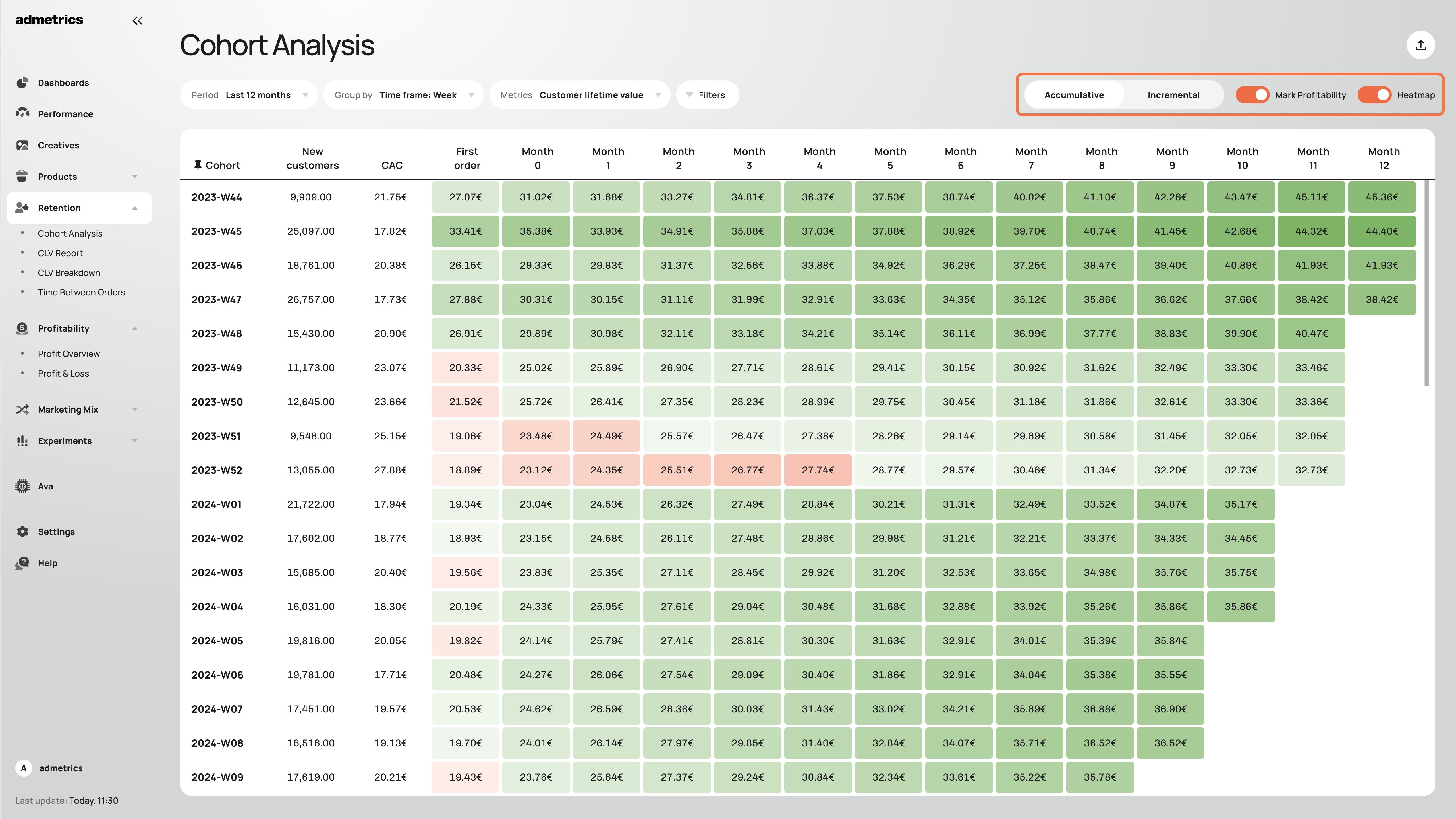
Key metrics like Contribution Margin, POAS (Profit on Ad Spend), and Customer Lifetime Value (CLV) are the new standard. While GA4 focuses on "events" and "users," scaling brands need to focus on unit economics—and that starts with better measurement.
Why GA4 Feels Complicated for Growth Teams
Even though GA4 is the industry giant, it was built for everyone—from blogs to apps—not specifically for DTC brands. This broad focus creates significant friction for eCommerce leaders:
- Data Sampling & Thresholding: GA4 often hides data when user counts are low to protect privacy, or samples data when traffic is high. This leaves you making decisions based on incomplete datasets.
- Attribution Bias: As a Google product, GA4 tends to over-credit Paid Search (Google Ads) and under-value top-of-funnel channels like Meta and TikTok.
- Signal Loss: Relying heavily on client-side cookies means GA4 misses conversions from users with ad blockers or iOS privacy protections.
- Complex "Event" Setup: Simple questions like "What is my net profit today?" require complex custom reports, BigQuery exports, and manual spreadsheet work.
Because of these issues, many teams find themselves "guessing" rather than "knowing."
How Admetrics Simplifies eCommerce Intelligence
Admetrics is purpose-built for eCommerce. It doesn't just track traffic; it tracks business health. By integrating directly with your shop system (Shopify/WooCommerce) and your ad platforms (Meta, TikTok, Google), it acts as a central source of truth.
1. Profit-First Dashboard
Admetrics pulls in all your costs—shipping, handling, COGS, and ad spend—to show you your True Net Profit in real-time. No more spreadsheets.
2. Server-Side Accuracy
Unlike GA4’s reliance on browser cookies, Admetrics uses advanced server-side tracking. This recovers up to 20%+ more conversion data that GA4 misses due to ad blockers and iOS updates.
3. Unbiased Multi-Touch Attribution
Admetrics uses data-driven attribution to show the true customer journey. It helps you see how a view on TikTok led to a click on Instagram and eventually a search on Google—giving credit where it's actually due.
GA4 vs. Admetrics: What’s Really Different
The table below highlights why brands are making the switch:
The Verdict: GA4 tells you what happened on your site (eventually). Admetrics tells you how your ads are driving profit and where to spend your next dollar.
How to View Actionable Metrics in Admetrics
Viewing your data in Admetrics is designed to be plug-and-play. Unlike the weeks of implementation required for a proper GA4 setup, Admetrics can be live in minutes.
Step 1: Install Admetrics
Connect Admetrics to your store (e.g., via the Shopify App Store). The pixel installation is handled automatically.
Step 2: Connect Ad Accounts
Link your Meta, Google, TikTok, and Pinterest ad accounts with a single click. Admetrics instantly imports your historical cost and campaign data.
Step 3: Define Your Costs
Input your COGS (Cost of Goods Sold) and shipping costs. This allows Admetrics to calculate Contribution Margin—the most critical metric for scaling.
Step 4: Open the "Profit Dashboard"
Navigate to the main dashboard. Here you will see:
- Blended ROAS: Your total efficiency across all channels.
- Net Profit: Your actual bottom line after all costs.
- POAS: Profit on Ad Spend (Are your ads actually profitable?).
Step 5: Run a "Lift Test"
Stop guessing. Use the Experiments tab to run a holdout test on Meta or TikTok to prove exactly how much incremental revenue your ads are generating.
Frequently Asked Questions
1. Is Admetrics a replacement for GA4?
Yes and no. Many brands keep GA4 for general website traffic stats (like bounce rate or time on page) but switch entirely to Admetrics for marketing decisions, attribution, and financial reporting because the data is more accurate and actionable.
2. Why is my ROAS higher in Admetrics than GA4?
GA4 relies on cookies, which are often blocked, causing it to "miss" conversions. Admetrics uses server-side tracking and first-party data to "see" conversions that GA4 ignores, giving you a more accurate (and usually higher) view of your performance.
3. Does Admetrics help with iOS14/15 privacy issues?
Absolutely. By using server-side tracking and advanced matching, Admetrics recovers data lost to Apple's privacy changes, helping you feed better data back to ad platforms for optimization.
4. Can I see which specific ads are driving profit?
Yes. Admetrics allows you to drill down to the ad creative level to see not just clicks, but the Net Profit and New Customer ROAS generated by specific creatives.
5. Is it difficult to set up?
No. Admetrics is designed for marketers, not developers. Most brands are fully set up with data flowing in under 15 minutes.
Final Thoughts: Why Brands Are Choosing Admetrics
In this guide, we looked at why relying solely on GA4 is risky for modern eCommerce. Between data lags, sampling, and a lack of focus on profitability, GA4 often obscures the very insights you need to grow.
Admetrics simplifies the chaos. It provides a clean, profit-focused view of your business, backed by the technical power of server-side tracking and multi-touch attribution.
If your goal is simply to count visitors, GA4 is fine. But if your goal is to scale profit, understand your customer journey, and invest your ad budget with certainty, Admetrics is the smarter choice.